
# General Settings
All settings concerning the whole simulation are visible in this section.

# Simulated Channels
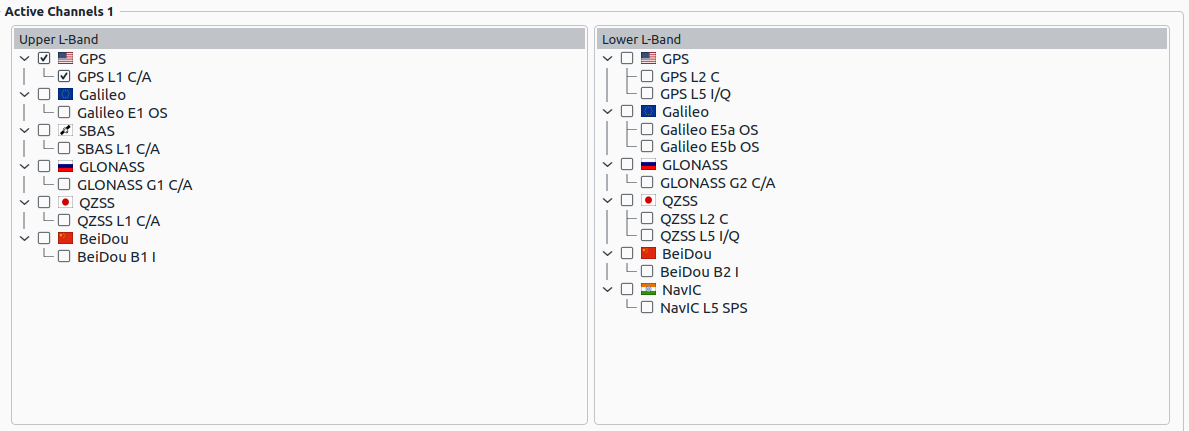
All satellite channels selected here are part of the final simulation. Based on the chosen band (L1 and L2) several IF files will be generated.
Note
If new channels are selected, but are not part of the front-end settings in the Receiver Settings, then the corresponding front-end settings have to be configured. Otherwise the scenario is invalid.
# General settings

| Parameter | Description |
|---|---|
| Scenario Name | The name of the current project. Note, that this is the filename of the scenario file (*.json) loaded. |
| Tracking Loop Noise | If enabled, simulated tracking loop noises based on signal to noise ratio will be applied to observations (not affecting IF signal) |
| Replay Noise | If enabeld, seeds are used for random noise generations; if disabled, new seeds are generated for noise generators. |
| Update Rate | [Hz] Update Rate of models in the simulation, i.e. receiver path computation and satellite orbit computation. |
# Run-time Settings

| Parameter | Description |
|---|---|
| Active | If enabled, XPLORA either creates a TCP/IP or an UDP server for run-time settings application (see Run-time API). |
| Port | Port number of TCP/IP or UDP server. |
| Protocol | Protocol used for run-time interface (TCP/IP or UDP). |
| Format | Choose the format of messages (SCPI or Datagram, see Run-time API). |
# Signal Settings Core Mode
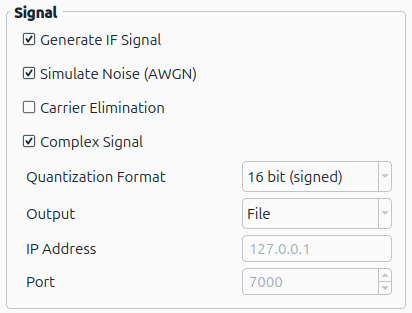
| Parameter | Description |
|---|---|
| Generate IF Signal | If enabled, an intermediate frequency signal will be generated (see Signal File). |
| Simulate Noise (AWGN) | If enabled, additive white Gaussian noise will be added to the IF signal. |
| Carrier Elimination | If enabled, the carrier of the signal will not be simulated (i.e. baseband only). |
| Complex Signal | If enabled, the generated IF signal will be complex-valued. |
| Quantization Format | Selects the quantization format of the IF signal. See the table and descriptions of quantization format below. |
| Output | Selects the output of the IF signal. See the table and descriptions of output below. |
| IP Address | IP address of server for IF signal UDP stream. |
| Port | Port of server for IF signal UDP stream. |
Quantization Format:
Note
When Complex Signal is enabled, then each sample is split in-phase & quadrature-phase part consecutively (x-bits long). i.e. when output-configuration is set to "8bit", then a 8 bit in-phase sample is followed by a 8 bit quadrature-phase sample.
| Value | Description |
|---|---|
| 1bit | 1 bit |
| 4bit | 4 bit signed |
| 8bit | 8 bit signed |
| 16bit | 16 bit signed |
| 4bit-unsigned | 4 bit unsigned |
| 8bit-unsigned | 8 bit unsigned |
| 16bit-unsigned | 16 bit unsigned |
Output:
| Value | Description |
|---|---|
| File | Writes IF signal samples into a file |
| Stream (UDP) | Streams IF signal samples over UDP |
Note
When output mode UDP stream is active, the IF signal is split up into packets. A packet consists of a header followed by the raw signal samples. For further info on the packet format, see UDP Output Stream
# Signal Settings Pro Mode
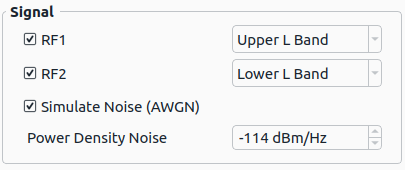
| Parameter | Description |
|---|---|
| RF1 | If enabled, the GNSS signals of the assigned L-Band (Upper or Lower) will be streamed via the RF1 output. |
| RF2 | If enabled, the GNSS signals of the assigned L-Band (Upper or Lower) will be streamed via the RF2 output. |
| Simulate Noise (AWGN) | If enabled, additive white Gaussian noise will be added to the RF signal. |
| Power Density Noise | [dBm/Hz] The used power density noise level, if AWGN is enabled. |
← Modes Time Settings →