
# Scenario Streaming
Note
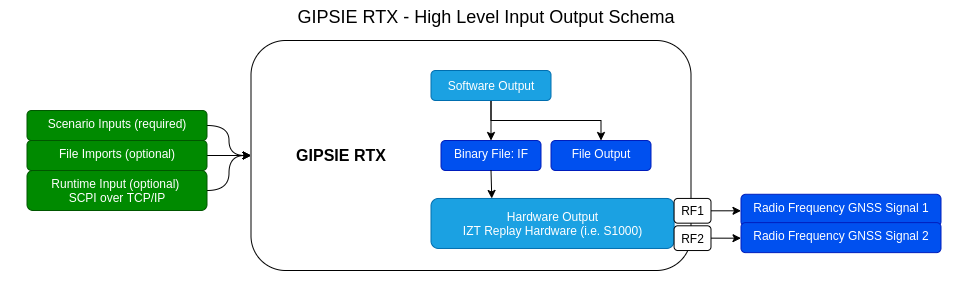
Scenario Streaming only applies, if GIPSIE is in the IF mode.
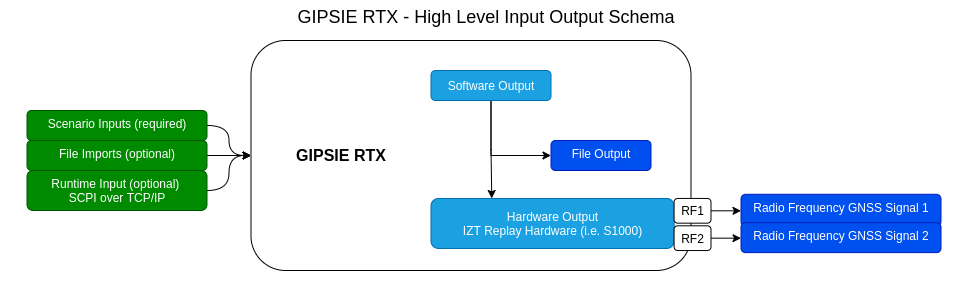
When the RTX mode of GIPSIE is selected, the IF file is immediatly upconverted and streamed over the respective RF antenna outputs of the S1000. No IF file is generated.
IF mode
RF mode
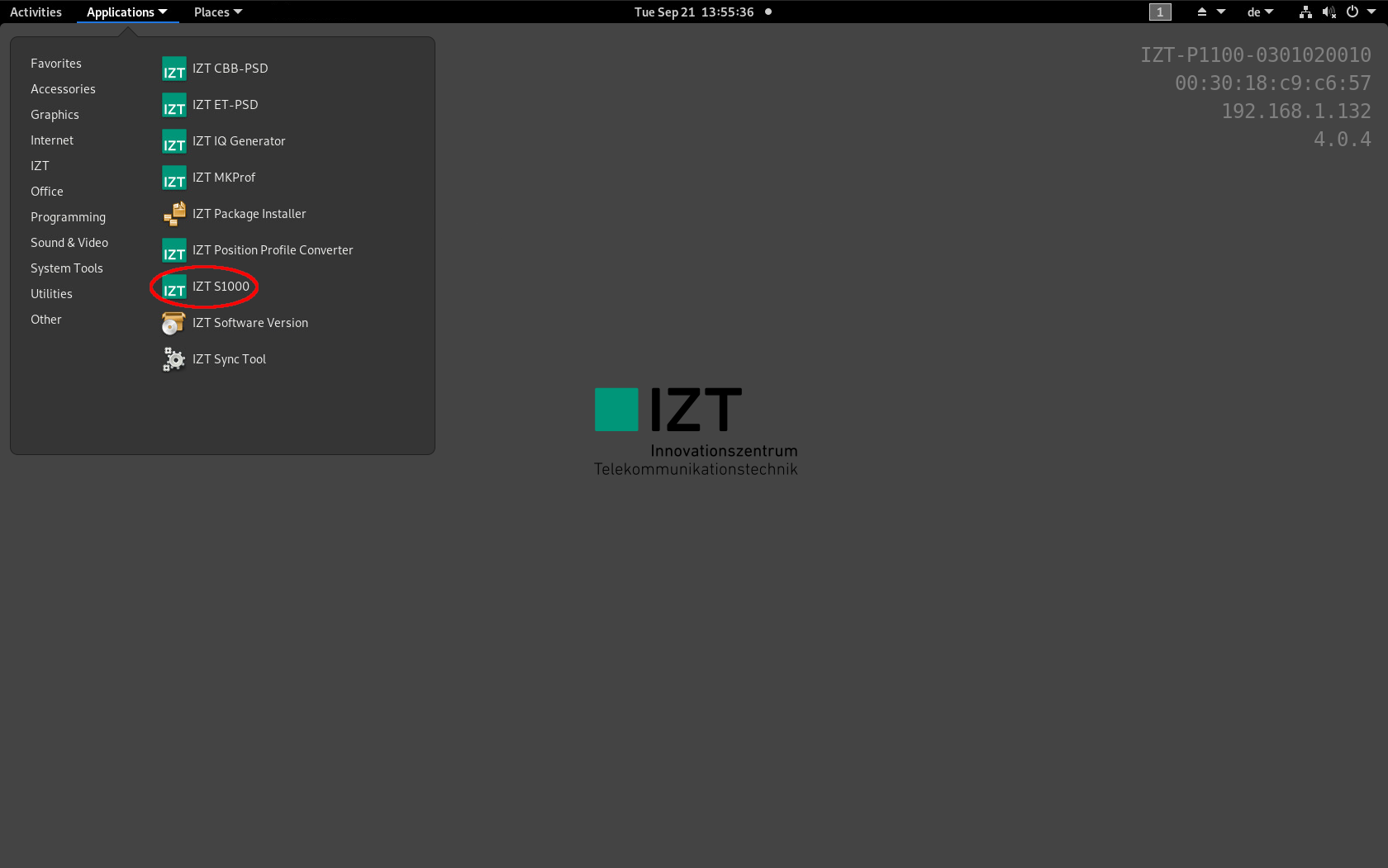
In order to up-convert IF binary files generated with GIPSIE® to RF and stream it, the IZT S1000 GUI is needed. After the system has booted up, the program can be found on the P1100 under Applications → IZT → IZT S1000.
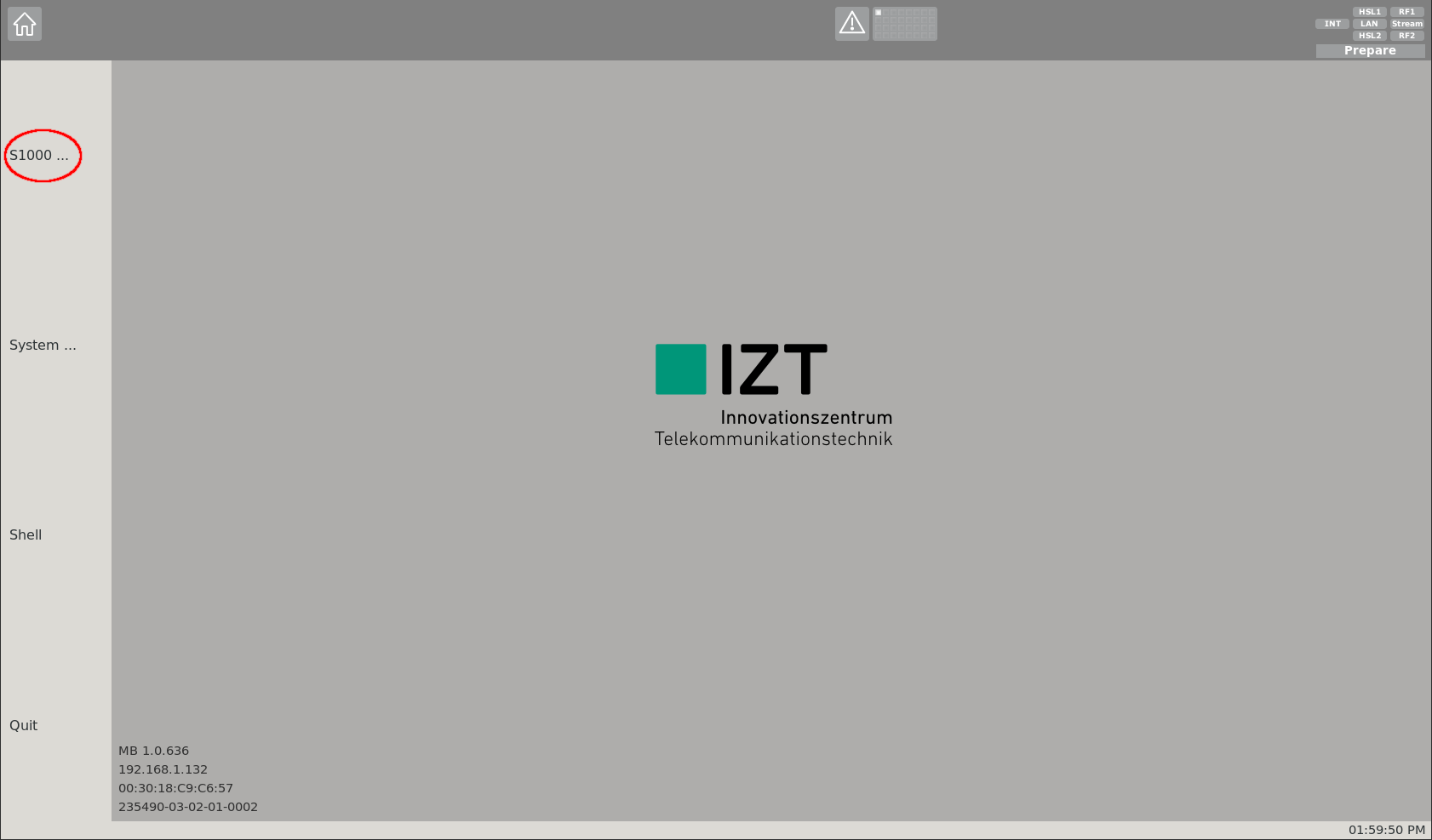
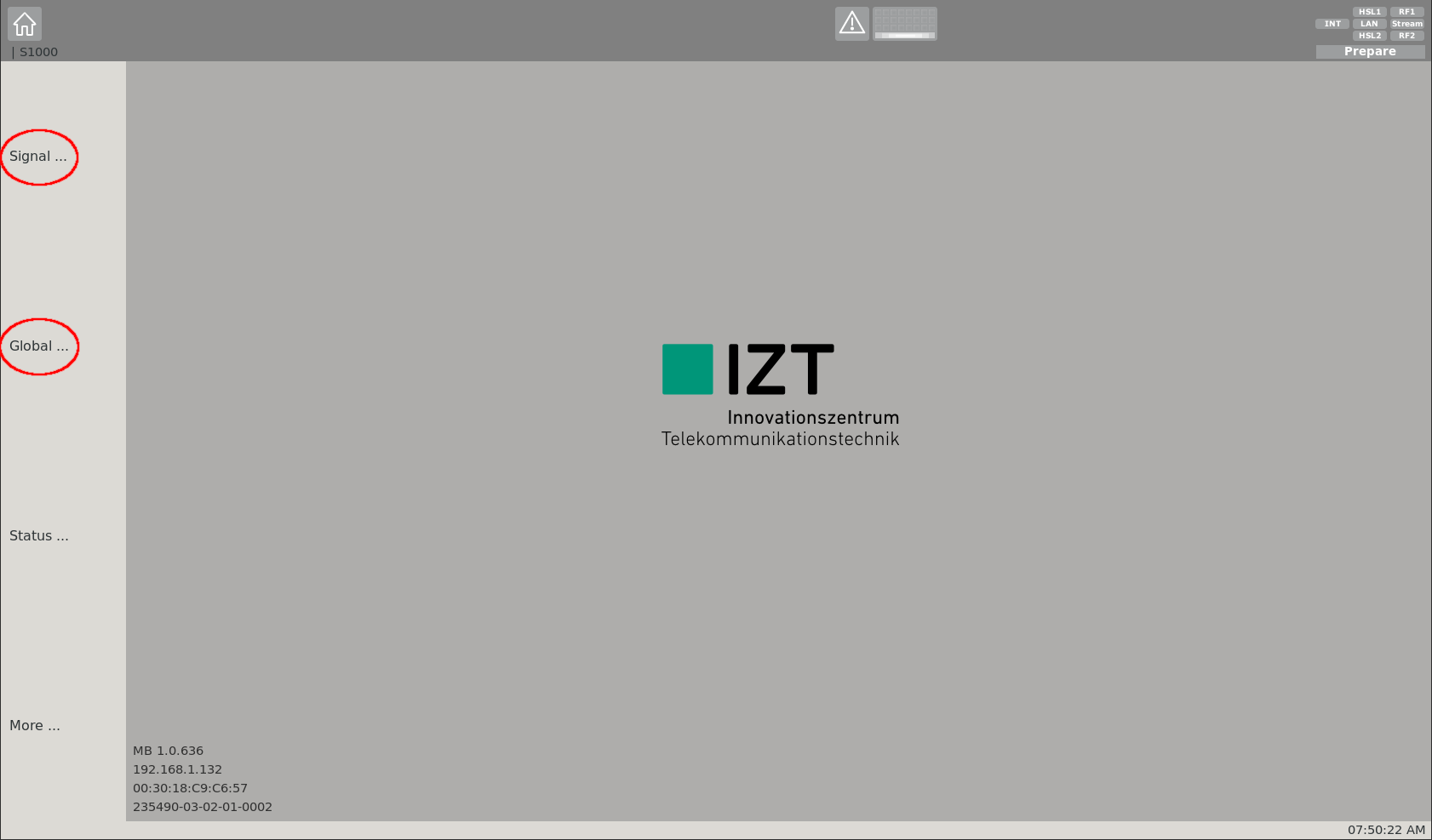
The front page of the GUI offers a variety of options. Within the navigation bar on the left side, different sub-pages can be accessed. For signal streaming, go to the S1000 sub-page by clicking at the S1000 ... section.
On this sub-page streaming options of the S1000 can be configured. Two sub-pages can be accessed from here:
- Signal: Signal specific settings page
- Global: Global RF settings page
It is recommended to first adapt the global settings by clicking at the Global ... section.
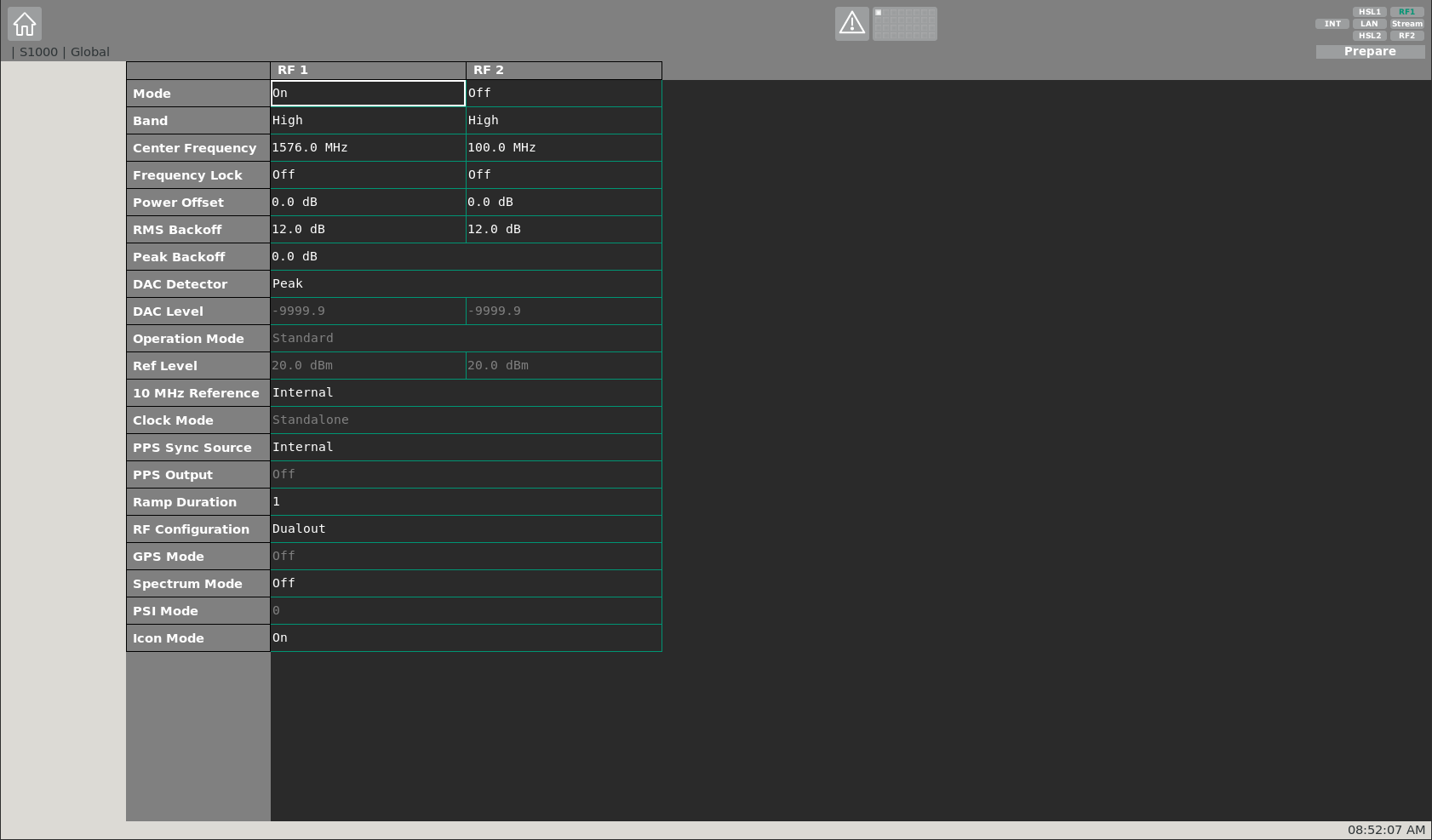
On the global settings sub-page, settings for both physical RF outputs can be adjusted. The most relevant ones are the Mode and Center-Frequency. Via the mode, a certain RF output can be toggled on/off (this can also be done via the toolbar on the top right). Each RF output of the S1000 covers a bandwidth of 120 MHz. The rest of the settings can remain unchanged.
The following table lists the most relevant GNSS center frequencies.
| GNSS Center Frequencies | |
|---|---|
| L1/E1 | 1575.420 MHz |
| L2 | 1227.600 MHz |
| L5/E5a | 1176.450 MHz |
| E5 | 1191.795 MHz |
| G1 | 1602.000 MHz |
| G2 | 1246.000 MHz |
| B1 | 1561.098 MHz |
| B2/E5b | 1207.140 MHz |
| GNSS | Band | Code | Modulation | Code Length | Data Rate | Min. Sampling |
|---|---|---|---|---|---|---|
| GPS | L1 | C/A | BPSK | 1.023 | 50 bps | 2.046 MHz |
| P | BPSK | 10.230 | 50 bps | 20.460 MHz | ||
| L2 | P | BPSK | 10.230 | 50 bps | 20.460 MHz | |
| C | BPSK | 1.023 | 25 bps / 50 sps | 2.046 MHz | ||
| L5 | I/Q | BPSK | 10.230 | 50 bps / 100 sps | 20.460 MHz | |
| Galileo | E1 | OS | BOC | 1.023, 1.023 | 125 bps / 250 sps | 4.092 MHz |
| PRS-like | BOC | 15.345, 2.5575 | 125 bps / 250 sps | 35.805 MHz | ||
| E5a | OS | AltBOC (E5) | 15.345, 10.230 | 25 bps / 50 sps | 20.460 MHz | |
| E5b | OS | AltBOC (E5) | 15.345, 10.230 | 125 bps / 250 sps | 20.460 MHz | |
| E5 (E5a+E5b) | OS | AltBOC | 15.345, 10.230 | - | 51.15 MHz | |
| E6 | PRS-like | BOC | 10.230, 5.115 | 125 bps / 250 sps | 30.69 MHz | |
| SBAS | L1 | C/A | BPSK | 1,023 | 250 bps / 500 sps | 2.046 MHz |
| GLONASS | G1 | C/A | BPSK | 0.511 | 50 bps / 100 sps | 1.023 MHz |
| G2 | C/A | BPSK | 0.511 | 50 bps / 100 sps | 1.023 MHz | |
| QZSS | L1 | C/A | BPSK | 1,023 | 50 bps | 2.046 MHz |
| SAIF | BPSK | 1,023 | 250 bps / 500 sps | 2.046 MHz | ||
| L2 | C | BPSK | 1,023 | 25 bps / 50 sps | 2.046 MHz | |
| L5 | I/Q | BPSK | 10,230 | 50 bps / 100 sps | 20.460 MHz | |
| E6 | LEX | BPSK | 5,115 | 2 kbps / 250 sps | 10.230 MHz | |
| Beidou | B1 | I | BPSK | 2,046 | 50 bps / 50 sps | 4.092 MHz |
| B2 | I | BPSK | 2,046 | 50 bps / 50 sps | 4.092 MHz | |
| IRNSS | L5 | SPS | BPSK | 10,230 | 50 bps | 20.460 MHz |
| S | SPS | BPSK | 10,230 | 50 bps | 20.460 MHz |
| Useful Combinations | Center | Sampling |
|---|---|---|
| L1/E1 + G1 | L1 | ≈ 31 MHz |
| L1/E1 + G1 + B1 | L1 | ≈ 50 MHz |
| L2 + G2 | L2 | ≈ 23 MHz |
| L5/E5a + E5b/B2 + E5 | E5 | ≈ 51 MHz |
After applying the global RF settings, the signal specific settings can be adapted. At this sub-page, i.a. the IF binary file can be selected, which will be up-converted to RF and streamed by the S1000. Up to 32 signals can be defined and de-/activated. An IF file can either be selected from memory or from a harddisk of the P1100.
Since the IF file is generated by GIPSIE®, it is stored in a defined directory on harddisk of the P1100. Therefore, the settings under the Memory section can be neglected.
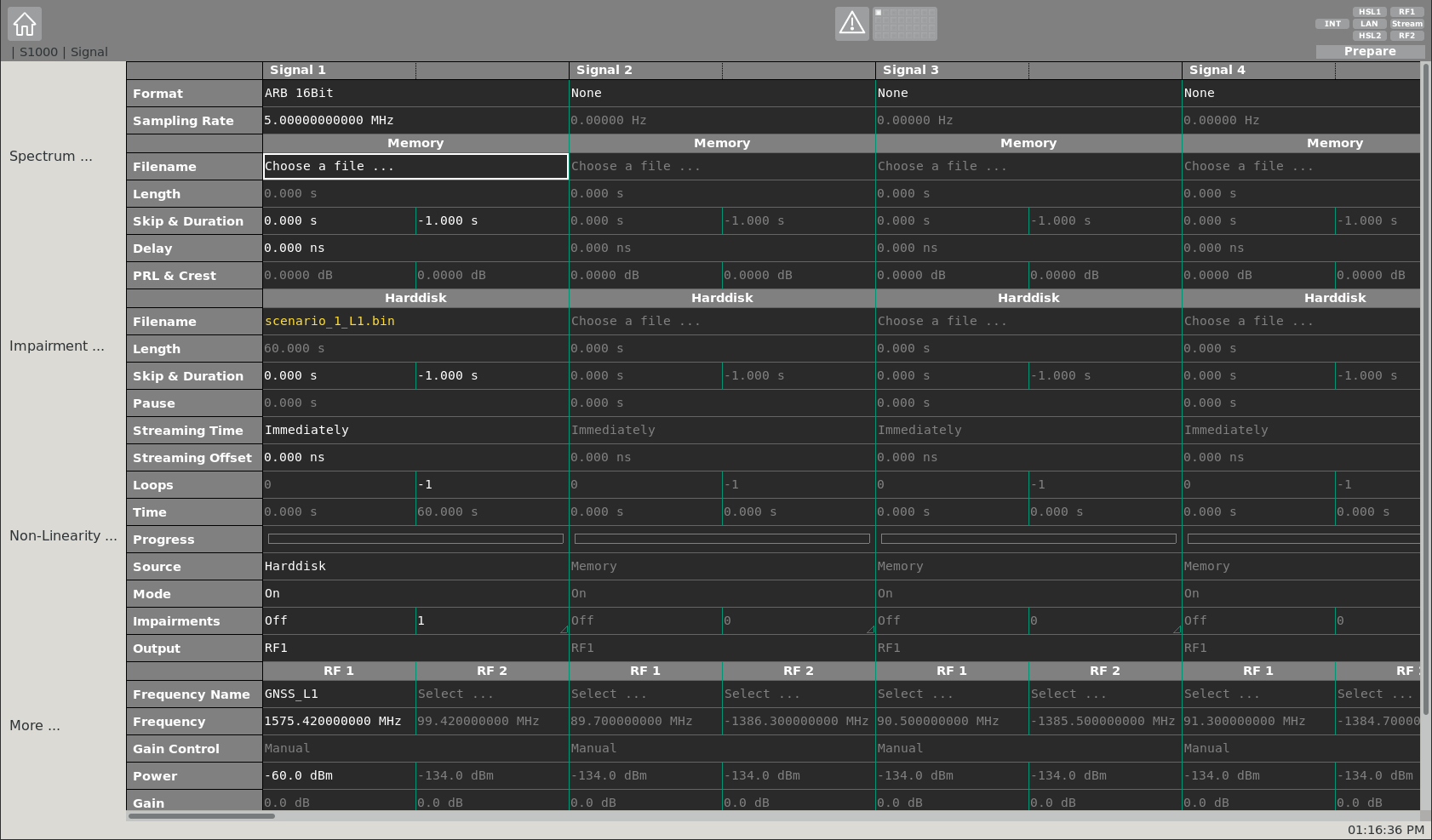
The most relevant signal specific settings are described in the following:
- Format - Specifies the quantization of the selected IF file (16 bit in case of GIPSIE®)
- Sampling Rate - Specifies the sampling rate of the IF file
- Filename - Specifies the location of the IF file on harddisk
- Skip and Duration - Specifies a desired time-span which shall be skipped at start of the file. Furthermore the duration can be defined (-1 specifies a duration until end of file)
- Streaming Time - Specifies the time, when the streaming shall start
- Source - Specifies the source where the IF file is located (choose Harddisk)
- Mode - Toggle signal on/off
- Output - Specifies the RF output (RF1, RF2, RF1 & RF2)
- Frequency Name - Specifies the center frequency of the generated IF signal by name
- Frequency - Specifies the center frequency of the generated IF signal by value (in case the IF is set to 0 MHz within the GIPSIE® simulation it equals exactly the nominal center frequency)
- Power - Specifies the power of the signal at RF output in dBm
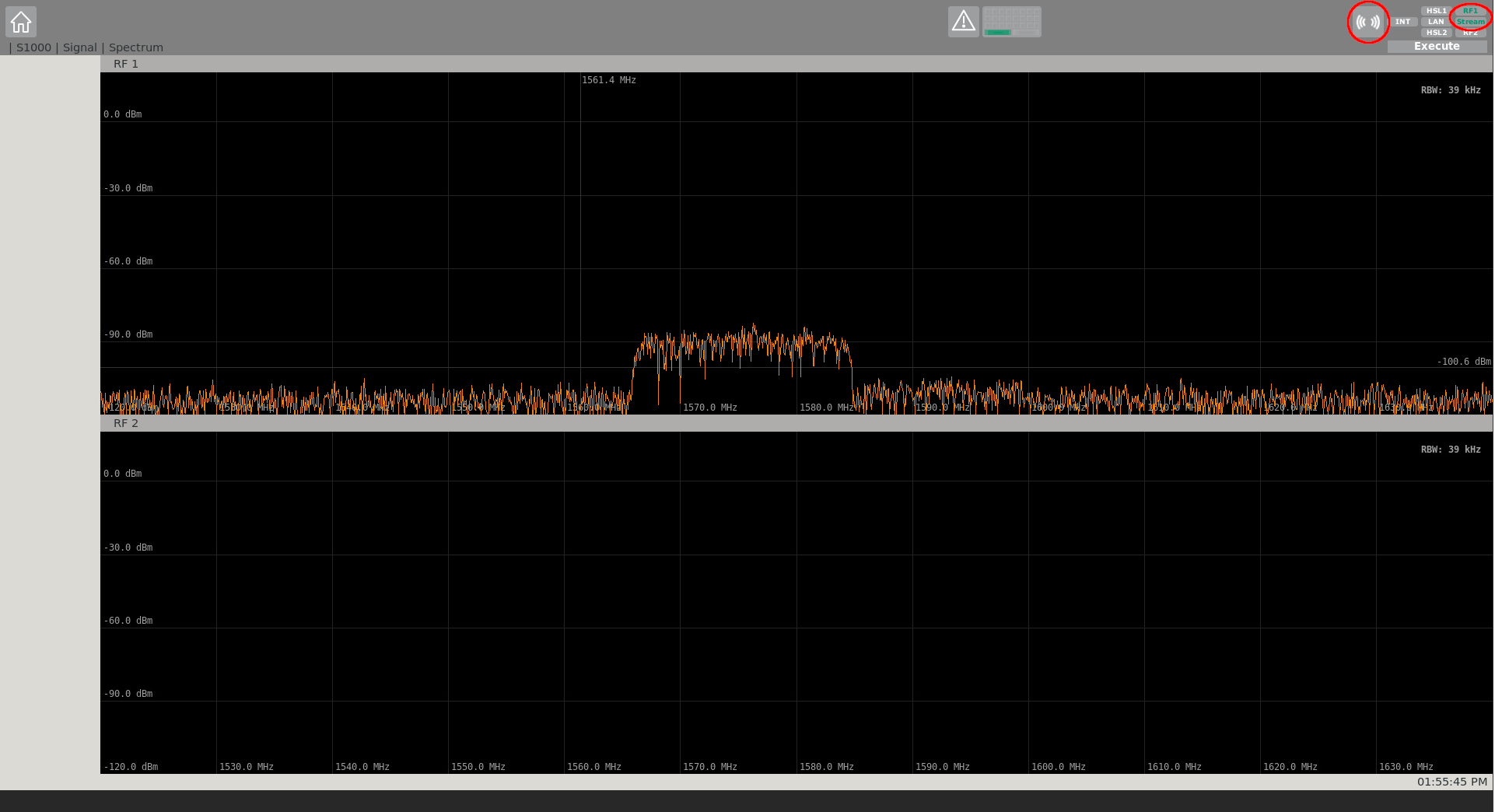
After applying all signal specific settings, the streaming of the IF file can be started. This is done, via the Stream button on the top right corner within the streaming toolbar. In order to stop the stream, the Stream button can be clicked again. By clicking at the frequency icon within the streaming toolbar, the frequency spectrum of the live stream can be displayed. Via the signal specific sub-page, the signal power can be changed during run-time of the stream.
NOTE
Make sure the appropriate RF channel is activated (green) too.
In the following, two examples are given for comparison purposes. Possible GIPSIE® scenario settings are given with their respective IZT S1000 GUI settings, to showcase a proper streaming configuration.
# Example Scenario 1: GPS L1 C/A & Galileo E1 OS on RF1
| GIPSIE® Scenario | |
|---|---|
| Sampling Rate | 10.23 MHz |
| Intermediate Frequency | 0.0 MHz |
| Output Configuration | 16 bit per Sample (signed) |
| ADC Quantization Levels | 65536 |
| Filename | scenario.json |
| Desired RF Output | RF1 |
| IZT S1000 GUI Settings | |
|---|---|
| Format | ARB 16Bit |
| Sampling Rate | 10.23 MHz |
| Filename | scenario_1_L1.bin |
| Skip and Duration | 0.0 s & -1.0 s |
| Streaming Time | Immediately |
| Source | Harddisk |
| Mode | On |
| Output | RF1 |
| Frequency Name | GNSS_L1 |
| Frequency | 1575.42 MHz |
| Power | -70.0 dBm |
# Example 2: GPS L1 C/A & Galileo E1 OS on RF2
| GIPSIE® Scenario | |
|---|---|
| Sampling Rate | 10.23 MHz |
| Intermediate Frequency | +0.5 MHz |
| Output Configuration | 16 bit per Sample (signed) |
| ADC Quantization Levels | 65536 |
| Filename | scenario.json |
| Desired RF Output | RF2 |
| IZT S1000 GUI Settings | |
|---|---|
| Format | ARB 16Bit |
| Sampling Rate | 10.23 MHz |
| Filename | scenario_1_L1.bin |
| Skip and Duration | 0.0 s & -1.0 s |
| Streaming Time | Immediately |
| Source | Harddisk |
| Mode | On |
| Output | RF2 |
| Frequency Name | - |
| Frequency | 1574.92 MHz |
| Power | -70.0 dBm |